
Note: the process described on this page is available in the merchant dashboard. No public API for creating payouts is currently declared in the documented /api/v1 contract.
Only successful payments older than 3 days are offered for a payout request. More recent payments remain visible in your transactions, but they cannot be selected for a payout yet.
Setting up a payout method
Before submitting a request, you must set up your payout method from the Demandes de reversement (Payout requests) page in the side menu, with the Configurer un mode de reversement (Set up a payout method) button. The Ajouter un mode de reversement (Add a payout method) form asks for the payment method and then the corresponding details, and shows the withdrawal fees applicable to this method before saving: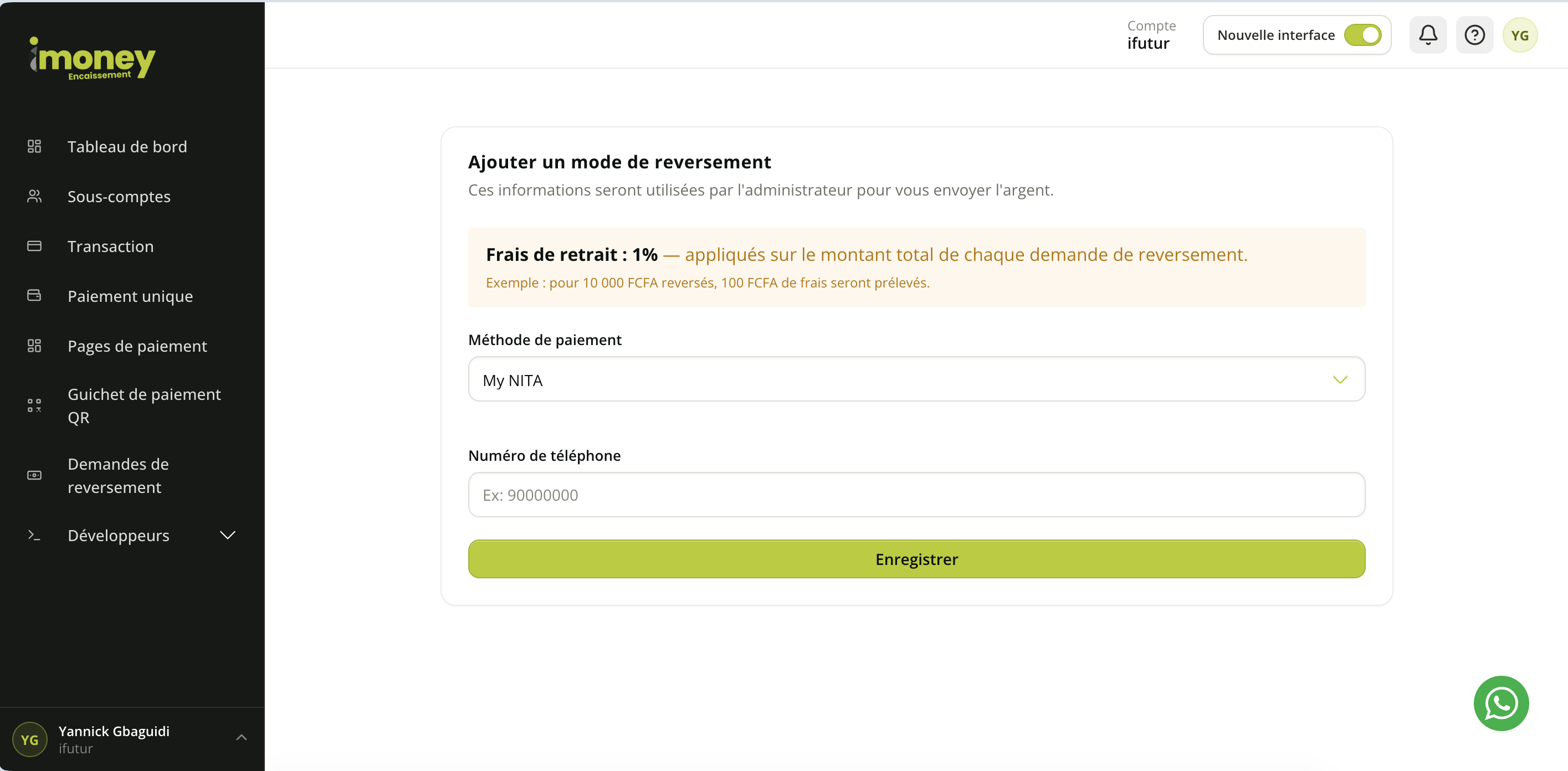
For a bank transfer, the RIB is mandatory.
You can save several payout methods (for example My NITA and a bank transfer) and enable or disable each of them from this same page. When creating a request, the last active method used is preselected, but you can choose any other active method.
Creating a payout request
The Nouvelle demande (New request) button opens the list of eligible transactions. You can search and filter transactions by reference or by period, then select the payments to include in the request. The list only shows payments that can be paid out. A payment must therefore have been validated more than 3 days ago before it appears in this list. At the top of the page, the Mode de reversement (Payout method) block offers the destination to use for this request (the last active method used is preselected); the Résumé de la demande (Request summary) block sums up, as you select transactions, the number of transactions chosen, the gross amount, the estimated fees and the net amount paid out, before you confirm with Soumettre la demande (Submit request):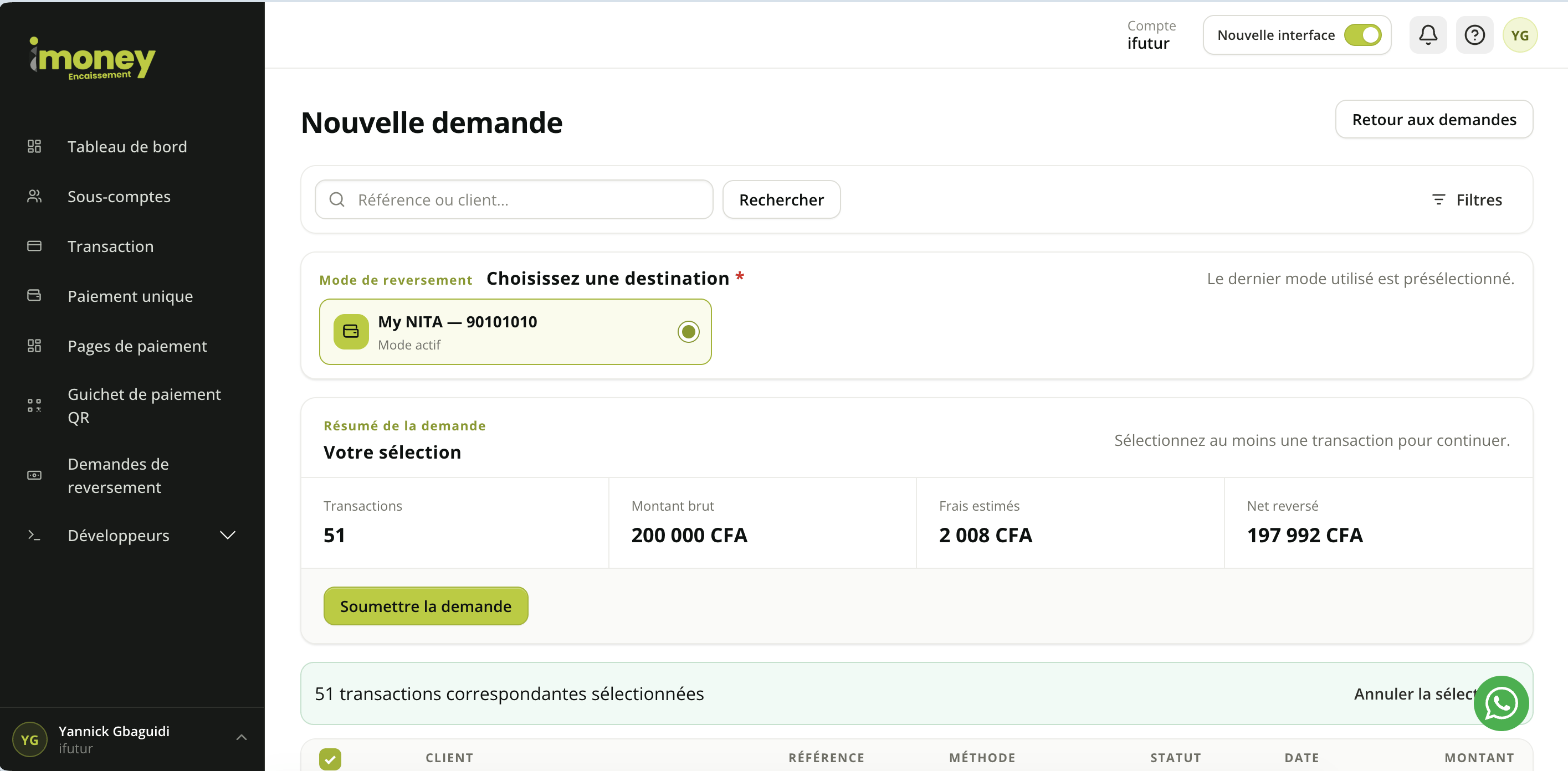
- it is successful;
- it has not been paid out yet;
- it is not already attached to a payout request;
- it was validated or created more than 3 days ago.
Collection fees
iMoney Encaissement applies fees depending on the payment method used, the merchant account configuration and who bears the fees. Each recorded payment contains several amounts:- Montant (Amount): amount paid by the customer or amount requested from the customer.
- Frais de Transaction (Transaction fees): fees applied to the operation.
- Montant net (Net amount): amount actually available to the merchant after fees, when the fees are borne by the merchant.
Fees by payment method
Thepayment_method field of a transaction shows the payment method used by the customer. Each method has its own fee configuration. The available methods depend on those enabled on your account:
Only mobile money is available through a direct call to
POST /payments (Ipay-Payment-Type: mobile). All other methods go through payment by link.
Fees borne by the customer or by the merchant
For each payment method, iMoney Encaissement can be configured in two ways:- Fees borne by the customer: the customer pays the requested amount and the fees are added to, or included in, the total amount processed.
- Fees borne by the merchant: the fees are deducted from the collected amount before the balance becomes available for payout.
Payout fees
The withdrawal fees per method are listed in the methods table above, and are shown again when you set up the payout method (see the screenshot above). While you select transactions, the interface shows in real time, in the request summary:- the number of selected transactions;
- the gross amount;
- the estimated fees, calculated on the gross amount according to the chosen payout method;
- the net amount paid out (gross amount minus estimated fees).
Tracking requests
The Demandes de reversement (Payout requests) page lists the created requests with the following columns:- Référence (Reference): reference of the request.
- Montant total (Total amount): gross amount requested.
- Nb transactions (Number of transactions): number of payments included.
- Statut (Status): current state of the request.
- Date: creation date.
- Voir (View): opens the request details.
- En attente (Pending): the request has been created and is waiting to be processed.
- Validé (Validated): the request has been approved and settled.
- Rejeté (Rejected): the request has been refused. A rejection reason may be shown in the details.
Request details
The details page shows the reference, the total amount, the status, the withdrawal fees, the net amount paid out, the configured payout method and the list of selected transactions. For a bank transfer, the bank details and the RIB can be viewed when available.Warning: once a request has been submitted, the selected transactions are reserved for this request and can no longer be used in another payout request.
Note: the fees shown in your interface may depend on your merchant contract and the payment methods enabled. If in doubt, contact iMoney Encaissement support to confirm the fees applied to your account.